
Your first numerology API call is one POST request from your server. Send it to https://apiforastrology.com/api/numerology/v1/profile, with your API key as a Bearer token. The JSON body needs two fields: name, in English letters, and birth_date, as YYYY-MM-DD. Birth time and place play no part.
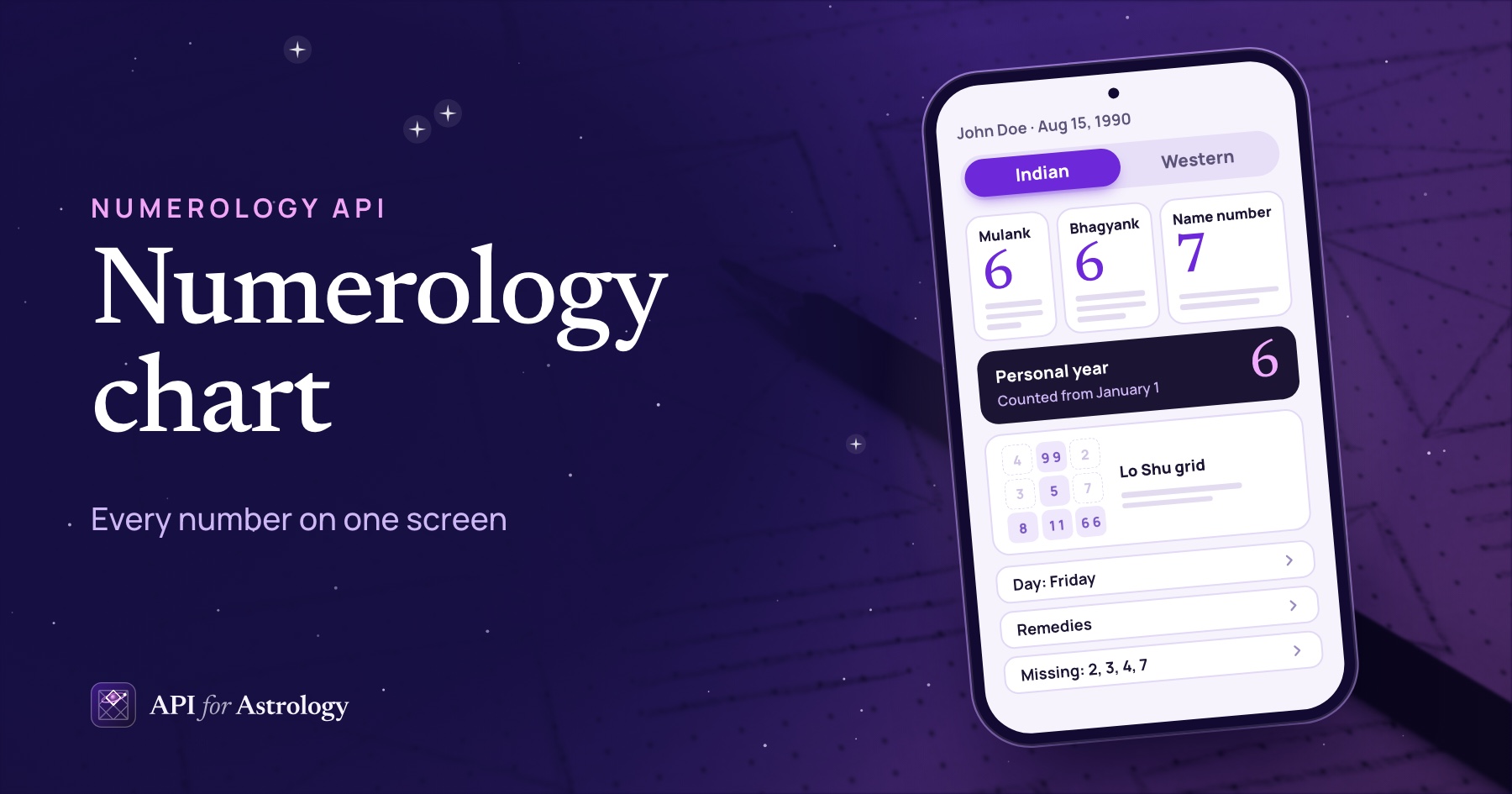
For John Doe, born Aug 15, 1990, the answer is about 10 KB of JSON. His mulank (birth day number) is 6. His bhagyank (destiny number) is also 6. His name number, from the letters of his name, is 7. The same answer holds his Lo Shu grid (a square built from his date's digits), lucky day and colors, and remedies. Each part comes with a short reading.
To get a key, follow step 1 of the docs quickstart. One key works for both our Astrology API and our Numerology API.
Below, we run the call in curl, JavaScript and Python, then read the answer block by block. After that come two next calls, Hindi and longer readings, and the errors you will meet first. Every answer is real, from our own engine, run on Oct 17, 2026.
Before your first call: a key and two fields
Keep the key on your server. Every key begins with afa_test_ or afa_live_, and this post uses the placeholder afa_live_xxx. Put your key in an environment variable. Make every call from your backend, so the key never reaches a browser or a phone.
export ASTROLOGY_API_KEY="afa_live_xxx"Send two fields. The name is the full name, spelled the way the person spells it, in letters from A to Z. Spaces, dots, hyphens and apostrophes are fine. The birth_date is used exactly as sent, with no time of day.
Start with John Doe. A test key answers numerology for two sample people only, and John is one of them. So every successful call below also works on a test key.
Make your first numerology API call
Here is the same request three ways. Each one reads the key from the environment.
curl. It prints the whole answer, 10,325 bytes for John:
curl -X POST "https://apiforastrology.com/api/numerology/v1/profile" \
  -H "Authorization: Bearer $ASTROLOGY_API_KEY" \
  -H "Content-Type: application/json" \
  -d '{"name": "John Doe", "birth_date": "1990-08-15"}'
JavaScript. Node has fetch built in, so no package is needed. We ran this on Node 24:
// John Doe, born Aug 15, 1990. Run it as a module: node first-call.mjs
const response = await fetch("https://apiforastrology.com/api/numerology/v1/profile", {
  method: "POST",
  headers: {
    Authorization: `Bearer ${process.env.ASTROLOGY_API_KEY}`,
    "Content-Type": "application/json",
  },
  body: JSON.stringify({ name: "John Doe", birth_date: "1990-08-15" }),
});
const data = await response.json();
if (!response.ok) {
  throw new Error(`${response.status} ${data.error.code}: ${data.error.message}`);
}

console.log("mulank:", data.mulank.number);
console.log("bhagyank:", data.bhagyank.number, "from", data.bhagyank.total);
console.log("name number:", data.name_number.chaldean.number);
console.log("missing from the grid:", data.loshu.missing.map((item) => item.number));
Python. This one needs the requests package:
# John Doe, born Aug 15, 1990. Needs the requests package: pip install requests
import os
import requests

response = requests.post(
    "https://apiforastrology.com/api/numerology/v1/profile",
    headers={"Authorization": f"Bearer {os.environ['ASTROLOGY_API_KEY']}"},
    json={"name": "John Doe", "birth_date": "1990-08-15"},
    timeout=30,
)
data = response.json()
if not response.ok:
    error = data["error"]
    raise SystemExit(f"{response.status_code} {error['code']}: {error['message']}")

print("mulank:", data["mulank"]["number"])
print("bhagyank:", data["bhagyank"]["number"], "from", data["bhagyank"]["total"])
print("name number:", data["name_number"]["chaldean"]["number"])
print("missing from the grid:", [item["number"] for item in data["loshu"]["missing"]])
Both scripts print these four lines. Python shows the list as [2, 3, 4, 7].
mulank: 6
bhagyank: 6 from 33
name number: 7
missing from the grid: [ 2, 3, 4, 7 ]
We ran all three against our engine on Oct 17, 2026, with only the web address swapped for a local one. Errors come back as JSON too, so both scripts stop with the status and the error code.
What comes back: the answer, block by block
The profile answer has 10 top-level blocks:
Block | What it holds | John Doe's value |
|---|---|---|
| The name and date as the API read them | John Doe, 1990-08-15 |
| Birth day number, planet, reading, 5 topics | 6, Venus |
| Destiny number and its total before the last step | 6, from 33 |
| The name in two letter tables | 7 (Chaldean), 8 (Pythagorean) |
| A nine-cell grid built from the date | 2, 3, 4 and 7 missing |
| Day, colors, friendly numbers and good dates | Friday, white and pastel pink |
| Direction, deity, fast day, gemstone and mantra | South-east, Lakshmi, Friday, diamond |
| What other routes return instead | Western numbers, compound meanings |
| One line on what numbers can and cannot say | Tendencies, not fixed events |
| The language and length you got | en, standard |
Each number also has a short about line that says where it comes from. Use it as help text under the number.

The three core numbers, and the choices they leave you
The mulank uses the day alone: 15 gives 1 + 5 = 6. The bhagyank adds the date's eight digits to 33, then 3 + 3 = 6. Our post on how each core number is worked out shows every step. Here, the question is what your screen does with the fields.
Decide how to show a master number. A master number is 11, 22 or 33. Indian numbers are always reduced to a single digit, so bhagyank.number is 6. But total is 33 and master is true. Show the 6 with a short note that a master number came up on the way. Do not print total and number as a pair, such as "33/6". On many dates with the flag, total is 29, 38 or 47, and none of those is a master number.
Pick the name table you show first. Chaldean is the letter table Indian numerology uses, with values 1 to 8. The default_system field names it as the default. JOHN gives 1 + 7 + 5 + 5 = 18, and DOE gives 4 + 7 + 5 = 16. That is 34, then 7. Pythagorean, the Western table, gives 35, then 8. Only the Chaldean number has a reading, and the Pythagorean block says read: false. So show 7 as the name number, with 8 as a small label at most.
Use the short reading on a card. Here is John's mulank reading, word for word from the API: "You care about home, family and things that look good. People feel welcome around you. Watch for spending too much on comfort."
Use the topics on a detail page. The mulank and the bhagyank each carry 5 topics: nature, career, money, love and relationships, and health habits. For John, each runs 345 to 441 characters. A facet code such as career lets a tab bar map to each one.
The Lo Shu grid, lucky things and remedies
The Lo Shu grid is a square of nine cells, one per number, 1 through 9. The API drops the birth date's digits into it. It adds the bhagyank too, and the mulank for any day from the 10th on. For John, loshu.cells gives this grid and each number's count:
Row | Left | Center | Right |
|---|---|---|---|
Top | 4: none | 9: twice | 2: none |
Middle | 3: none | 5: once | 7: none |
Bottom | 8: once | 1: twice | 6: twice |
Draw the grid from cells, so you never hard-code the layout. The missing list holds 2, 3, 4 and 7, each with a reading. The repeated list holds 1, 6 and 9. The planes list names the full lines: practical (8, 1, 6) and willpower (9, 5, 1).
The lucky and remedies blocks both come from the mulank's planet, Venus. John gets Friday, white and pastel pink, and the friendly numbers 4, 5, 6 and 8. He also gets 13 dates in each month whose digits reduce to a friendly number. His remedies are the direction south-east, the deity Lakshmi, a Friday fast and a diamond. He also gets a beej mantra (a short seed mantra), in Devanagari and in English letters.
Show remedies with their notes. The gemstone's about line tells users to check their birth chart with an astrologer before wearing the stone. Put that line next to the stone. Finish with the not_claimed line. It says the numbers describe leanings, not set events.
Hindi and longer readings: lang and detail
Add ?lang=hi to get the readings in Hindi:
curl -X POST "https://apiforastrology.com/api/numerology/v1/profile?lang=hi" \
  -H "Authorization: Bearer $ASTROLOGY_API_KEY" \
  -H "Content-Type: application/json" \
  -d '{"name": "John Doe", "birth_date": "1990-08-15"}'
Codes stay in English, names change. In the Hindi answer, planet is still Venus, but planet_name is शुक्र. The lucky.day field is still Friday, and lucky.day_name is शुक्रवार. Of John's text fields, 56 stayed the same and 71 changed. So write your logic against the codes and print the _name fields. One code path then serves both languages.
Plan for a bigger answer. The Hindi answer was 20,867 bytes, about twice the English one. Each Devanagari character takes 3 bytes in UTF-8.
Check the fallback list. localization.fell_back_to_en names any text that had no Hindi version and came back in English. For John, it was empty.
Add detail=expanded for longer readings. It lengthens the 12 short readings of the core numbers and the Lo Shu grid. John's mulank reading grew from 126 to 593 characters, and the answer from 10,325 to 13,870 bytes. The topics stayed the same. With ?lang=hi&detail=expanded, the answer was 29,495 bytes, and both fallback lists were empty. Use standard for a card and expanded for a page about one number. Neither setting changes the reading credits.
Two next calls: Western numbers and the personal year
Two more routes take the same inputs. This function sends either one:
// The next two calls for John Doe: Western numbers and the personal year.
const BASE = "https://apiforastrology.com/api/numerology";

async function numerology(path, body) {
  const response = await fetch(BASE + path, {
    method: "POST",
    headers: {
      Authorization: `Bearer ${process.env.ASTROLOGY_API_KEY}`,
      "Content-Type": "application/json",
    },
    body: JSON.stringify(body),
  });
  const data = await response.json();
  if (!response.ok) {
    throw new Error(`${response.status} ${data.error.code}: ${data.error.message}`);
  }
  return data;
}

const western = await numerology("/v1/western?as_of=2026-10-01", { name: "John Doe", birth_date: "1990-08-15" });
console.log("life path:", western.life_path.number, "from", western.life_path.total);
console.log("expression:", western.expression.number);

const cycles = await numerology("/v1/cycles?as_of=2026-10-01", { birth_date: "1990-08-15" });
console.log("personal year, month, day:", cycles.year.number, cycles.month.number, cycles.day.number);
It printed:
life path: 6 from 15
expression: 8
personal year, month, day: 6 7 8
POST /v1/western returns the Western numbers, such as life path, expression and soul urge, with Pythagorean letter values. John's life path reduces the month, day and year first, to 8, 6 and 1, then adds them: 15, then 6. So his date gives a life path total of 15 but a bhagyank total of 33. If your app shows both, label the method behind each.
POST /v1/cycles needs only the birth date. It returns the personal year, month and day for as_of. On Oct 1, 2026, John is in year 6, month 7 and day 8. Leave as_of out, and the API uses its own date for today. To match a user's day, send their local date. Follow new endpoints in the numerology changelog.
Know the credits. On a live key, the profile and Western calls use 3 reading credits each, and cycles uses 2. The X-Reading-Credits-Counted header shows what each call used.
Every route, field and error code is in the API reference, where you can send each request with your own key. For what the Western route covers, see the Western numbers API.

Errors you will see on day one
Every error is JSON with one error object: a code, a message, and for input errors a field. Branch on the code, since messages can change. The 401 and 422 rows below are real answers, run on Oct 17, 2026. The 403 and 429 rows come from the gateway's code.
Status | Code | What caused it | What your app does |
|---|---|---|---|
401 |
| No key, or the placeholder | Change the key. Do not retry. |
403 |
| A test key, with anyone but the sample people | Use a live key for real users |
422 |
| जॉन डो, John Doe 2 or Jöhn Doé | Ask the user to retype it in English letters |
422 |
| 08/15/1990, or Feb 30 | Send a real date as |
422 |
|
| Send |
429 |
| Too many calls this minute on one key | Retry once the |
429 |
| This month's reading credits are used | Stop. No retry this month. |
401 says what is wrong. With no key, the message asked for a key as a Bearer token or an X-API-Key header. With the placeholder key, it said: The API key is invalid.
422 names the field. A name in Hindi letters, with a digit or with accents got this answer:
{
  "error": {
    "code": "invalid_input",
    "message": "Write the name in English letters (A to Z). Other scripts are not read, because the spelling changes the number.",
    "field": "name"
  }
}
The letters decide the number, so the API does not guess a spelling. If a user types a name in Hindi, ask them to type it again in English letters, as they usually spell it.
Check the name before you call. This function applies the same rule in your form:
// The same rule the API uses for a name: at most 100 characters, and after extra
// spaces are trimmed, a letter first, then letters, spaces, dots, hyphens and apostrophes.
function isNameTheApiReads(name) {
  if (name.length > 100) return false;
  const trimmed = name.split(/\s+/).filter(Boolean).join(" ");
  return /^[A-Za-z][A-Za-z .'-]*$/.test(trimmed);
}
We tested it on six names, and it agreed with the API on each one. It accepted John Doe, Mary-Jane O'Neil and a John Doe with extra spaces. It refused the Hindi spelling, the digit and the accents.
Test 422s on a live key. On a test key, the Hindi name and the 08/15/1990 date get the 403 instead, because the test-key check runs first. A failed call uses no reading credits.
Read the 429 code. A rate_limited answer clears within the minute. A reading_credits_exceeded answer lasts until credits reset on the 1st (UTC). A retry loop would only wait. The errors page has every code.
Test keys answer for two people only
For numerology, a test key answers for the two sample people in our docs only. They are John Doe, born Aug 15, 1990, and Jane Doe, born Mar 22, 1992. A date in the query must be left out or match the docs' examples, such as as_of=2026-10-01. That is why this post sends that date.
We ran the gateway's own test-key check on 10 requests. John and Jane passed, also with lang=hi&detail=expanded. A real person, Robert Smith, born Jan 2, 1988, was refused. So were as_of=2026-11-01 and two of the error cases above. A refused call gets this answer:
{
  "error": {
    "code": "sample_charts_only",
    "message": "Test keys return numerology only for the sample people in the docs: John Doe, born Aug 15, 1990, and Jane Doe, born Mar 22, 1992, for today or the dates in the docs examples. Use a live key for anyone else."
  }
}
Build your tests around John and Jane, and switch to a live key before real users arrive. A test call never uses reading credits. The test keys section of the docs has the limits.
The docs quickstart has this first call in PHP too, plus a Postman collection with John and Jane already in every request.

One request returns a whole numerology profile: three numbers, a grid, lucky things and remedies, each with a reading. What your code adds is checks and choices. Check the name before you send it. Branch on codes and print names. Pick the reading length for each screen, and test the whole flow with John and Jane first.